
Everyone is talking about AI. ChatGPT, Claude, Gemini — these tools are everywhere now. But here’s something I’ve noticed: most people try them once or twice, get a disappointing result, and walk away thinking, “AI doesn’t really work.”
If you’ve ever felt that way, I want to tell you something. The problem usually isn’t the AI. The problem is how to use ChatGPT for beginners — and nobody is actually teaching this part.
There’s a skill involved. A simple one. And once you understand it, everything changes.
The New Employee Analogy (This Will Make It Click)
Imagine you just hired a brilliant new employee. Incredibly smart. Has read thousands of books and reports. Can write, research, calculate, explain — you name it.
But it’s their first day. They don’t know your business, your clients, your preferences, or your style. They don’t know if you want something formal or casual, short or detailed.
Now, if you walk up to them and say “write me an email” — what are they going to produce? Something generic. Maybe even useless.
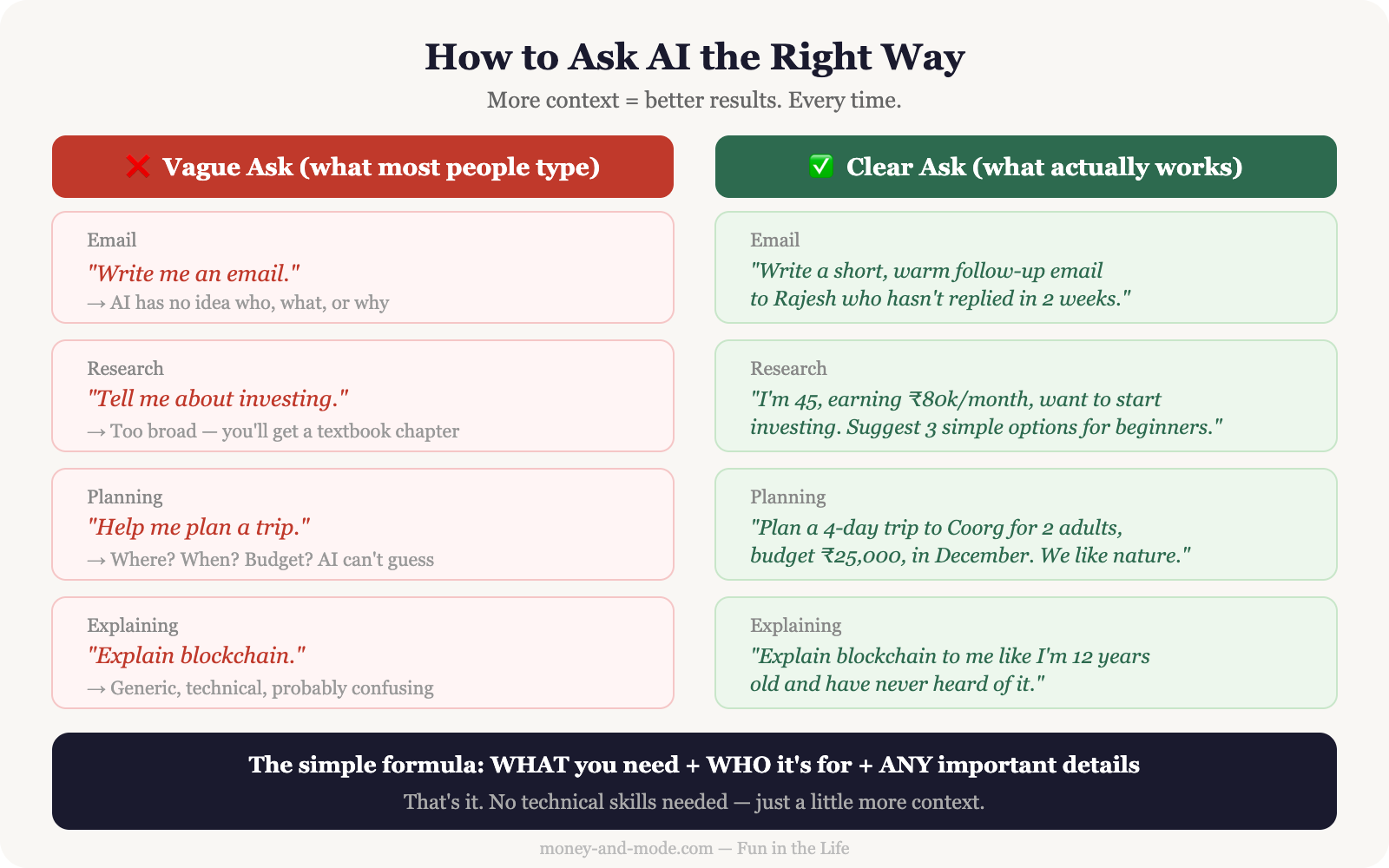
But if you sit down and say, “I need a polite follow-up email to a client named Rajesh who hasn’t replied in two weeks. Keep it short, warm, and professional. My name is Sandip” — now they can actually help you.
AI works exactly the same way. The more context you give, the better the result. This is the entire secret.
Why Most People Ask AI the Wrong Way
I’ve been using AI tools almost every day for over two years now. I use Claude — Anthropic’s AI — like a smart colleague sitting across from me. I talk to it like a person. I explain what I need, why I need it, and what kind of answer I’m looking for.
Most beginners don’t do this. They type one sentence, get a vague answer, and give up.
Here’s the honest truth from 25+ years of working with people: communication is everything. Whether you’re talking to a junior team member, a consultant, or a machine — the quality of what you ask determines the quality of what you get.
AI has just made this more visible than ever.
Bad vs. Good: Real Examples You Can Steal
Example 1 — Writing an email
Bad: “Write me an email.”
Good: “Write a polite follow-up email to a client who hasn’t replied in 2 weeks. Keep it short and professional. My name is Sandip.”
Example 2 — Summarising something
Bad: “Summarise this.”
Good: “Summarise this 5-page report in 5 bullet points for someone who is not technical. Focus on the key findings and any action items.”
Example 3 — Getting advice
Bad: “How do I save money?”
Good: “I earn around ₹60,000 a month, I have two kids in school, and I want to save at least ₹8,000 a month. Give me 5 practical tips that are actually doable for an Indian family.”
Example 4 — Planning something
Bad: “Help me plan a trip.”
Good: “Help me plan a 4-day trip to Coorg for 2 adults and 1 child. We prefer nature over shopping, our budget is modest, and we’ll be driving from Bangalore.”
Example 5 — Understanding a concept
Bad: “What is compound interest?”
Good: “Explain compound interest to me like I’m 30 years old and just starting to think about investing. Use a simple example with real numbers.”
The One Habit That Changes Everything
Here’s what I do every single time I use AI: I tell it who I am, what I need, and what I’ll do with the answer. That’s it. Three things.
For example: “I’m a small business owner in India. I need a simple WhatsApp message to send to my customers announcing a 10% discount this week. Keep it friendly and under 50 words.”
When I started doing this consistently, the results improved dramatically. I stopped getting generic answers. I started getting things I could actually use immediately.
As I’ve written before in How AI Is Changing Everyday Life, AI isn’t magic — it’s a tool. And like any tool, how you use it matters more than what it is.
This Is a Skill Worth Practising
The good news: you get better at this quickly. After a few tries, you’ll start to naturally include the right details without thinking about it.
And once you do, AI becomes genuinely useful in a way that surprises most people. You can use AI to save 2 hours every day on tasks that used to eat up your time — emails, research, planning, writing, summarising.
People sometimes worry about AI taking their jobs. But the people I see thriving are the ones who treat AI as a collaborator, not a threat. And the first step is learning to communicate with it well.
This isn’t a technical skill. It’s a human skill — the same skill that makes you good at managing people, explaining ideas, or getting what you need from a conversation.
Frequently Asked Questions
Why do I get disappointing results from AI?
Usually the problem is not the AI — it is how the question was asked. Most people type one vague sentence, get a generic answer, and conclude AI does not work. The quality of what you ask determines the quality of what you get.
What is the simplest way to get better answers from AI?
Tell it three things every single time: who you are, what you need, and what you will do with the answer. That one habit turns generic responses into something you can use immediately.
What does a good AI prompt look like compared to a bad one?
Bad: “Write me an email.” Good: “Write a polite follow-up email to a client who hasn’t replied in 2 weeks. Keep it short and professional. My name is Sandip.” The difference is context — the situation, the tone, the length and who it is for.
Is prompting a technical skill?
No. It is a human skill — the same one that makes you good at briefing a colleague or explaining an idea clearly. Think of AI as a brilliant new employee on their first day: capable of a great deal, but they do not yet know your business, your style or your situation.
What’s the first thing you’d ask AI to help you with — if you knew how to ask it the right way? Drop it in the comments below.