
I want to tell you something that surprised me.
A few months ago, I started tracking how long certain tasks took me — the daily ones I never really thought about. Writing emails. Researching things. Summarising articles. Making decisions. Basic stuff.
Then I started using AI for those same tasks.
The difference was almost embarrassing. Tasks that took 40 minutes were done in 8. Things I’d procrastinate on for days because they felt tedious — done in one sitting.
Over the course of a week, I was getting back nearly 10 hours. Every week.
Now I know what you’re thinking: “This is for tech people.” Or: “I’m too old for this stuff.” Or: “It sounds complicated.” I thought all of that too. I was wrong. Let me show you exactly what I mean.
The 5 Tasks AI Does Faster Than Any Human (Including You)
1. Writing Emails and Messages
This is the biggest time-saver most people never expect.
Think about how much mental energy you spend on emails. Not just typing — thinking. What’s the right tone? How do you say no without sounding rude? How do you follow up without seeming desperate?
AI handles all of this instantly. You just tell it: “I need to email my builder who is delaying my renovation. I’m frustrated but want to stay professional. Here are the key points: [list them].”
It gives you a draft. You read it, adjust two sentences, and send. Total time: 4 minutes instead of 25.
This works for: work emails, landlord messages, complaint letters, requests, apologies, follow-ups, cover letters — anything you’d normally agonise over.
2. Research and Information Gathering
Old way: open Google, get 47 results, read 6 articles, try to piece together an answer.
New way: ask AI directly. “What are the pros and cons of investing in index funds vs real estate in India right now?” It gives you a structured, balanced answer in seconds.
Is it always perfect? No. You should verify important information. But for getting oriented on a topic, AI saves enormous time.
3. Summarising Long Documents
You know that feeling when someone sends you a 12-page PDF and you need to understand it but you just… can’t face it?
Paste it into an AI tool and ask: “Summarise this in 10 bullet points. Highlight anything I need to action.” Done. Five minutes instead of forty-five.
This works for contracts, reports, news articles, school circulars, insurance documents, financial statements — anything long and dense.
4. Planning and Thinking Through Decisions
Stuck on a decision? AI is a surprisingly good thinking partner.
Tell it the situation: “I have two job offers. One pays more but requires travel. The other is lower salary but fully remote. I have two young kids. Help me think through this.”
It won’t make the decision for you — and it shouldn’t. But it will raise angles you hadn’t considered, organise the trade-offs clearly, and ask you the questions that actually matter.
5. Learning New Things Quickly
Whatever you’re trying to learn — investing, cooking, parenting, health, a new skill — AI can teach you faster than any book or YouTube video, because it adapts to your level and your questions.
Ask it: “Explain compound interest to me like I’m a complete beginner.” Then: “Give me a real-life example with actual numbers.” Each answer builds on the last. Most people understand things they’d struggled with for years — in under 20 minutes.
Your 2-Hour Daily Saving Plan
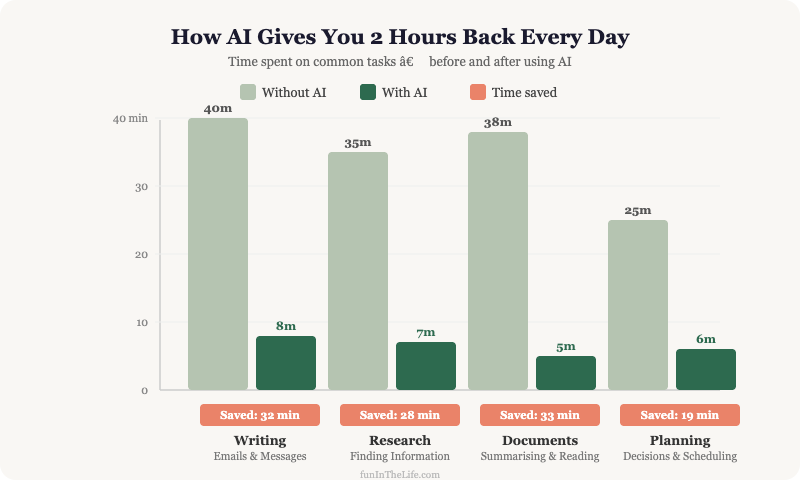
Here’s a realistic breakdown of where the time comes from:
- Writing emails/messages: 45 min → 10 min (saves 35 min)
- Research on any topic: 40 min → 10 min (saves 30 min)
- Reading/summarising documents: 30 min → 5 min (saves 25 min)
- Planning / decision thinking: 20 min → 5 min (saves 15 min)
- Learning something new: 30 min → 10 min (saves 20 min)
- Total saved: over 2 hours every single day
The Tools You Need (All Free to Start)
ChatGPT (chat.openai.com) — The most well-known. Free version is very capable. Good for most tasks.
Claude (claude.ai) — My personal preference. Tends to give more nuanced, thoughtful responses. Free version available.
Google Gemini (gemini.google.com) — Integrates well with Gmail and Google Docs. Useful if you already live in Google’s ecosystem.
You don’t need all three. Pick one, use it for a week, see how it feels.
The One Rule That Makes All the Difference
Here’s the mistake most beginners make: they ask vague questions and get vague answers.
“Help me with my email” → Vague question, useless answer.
“Help me write a firm but polite email to my internet provider who has failed to fix my connection for 3 weeks, despite two service visits. I want a refund for the downtime and a commitment to fix it by Friday.” → Specific question, excellent answer.
The rule: give AI context. The more detail you give, the better the output. Think of it like briefing a new assistant — the more they understand your situation, the better they can help.
Start Small. Start Today.
Don’t try to revolutionise your entire workflow at once. Pick one task from this list — the one that drains you the most — and use AI for it today. Just once. See what happens.
I promise: within a week of consistent use, you will never want to go back to doing it the old way.
Two hours a day. Every day. That’s what’s waiting for you on the other side of a 5-minute experiment.
Frequently Asked Questions
How much time can AI realistically save each day?
Over two hours for most people. Emails drop from about 45 minutes to 10. Research goes from 40 minutes to 10. Summarising documents falls from 30 minutes to 5. Decision-planning from 20 to 5, and learning something new from 30 to 10.
Which everyday tasks does AI handle best?
Five of them: writing emails and messages, research and information gathering, summarising long documents, thinking through decisions, and learning new things quickly. These are the repetitive, draining tasks most people never think to hand off.
Do I need technical skills or paid tools to save time with AI?
No. ChatGPT, Claude and Google Gemini all have genuinely capable free versions, and none require installation or setup. You do not need all three. Pick one, use it for a week, and see how it feels.
Why do I keep getting vague answers from AI?
Because the question was vague. “Help me with my email” produces nothing useful. Give context — who you are, the situation, the tone you want, and what you will do with the answer. Think of it as briefing a new assistant: the more they understand, the better they help.
Which task from this list would save you the most time? Tell me in the comments and I’ll show you exactly how to use AI for it.