
Every week, someone asks me: “Sandip, I keep hearing about AI — but is there anything free I can actually use?” The good news is yes. The best free AI tools for everyday use are already out there, and most of them take less than five minutes to get started. You don’t need to be a tech person. You don’t need to pay anything. You just need to know where to look.
I run a technology company. I use AI every single day. And I’ll be honest — even I was overwhelmed at first. So I’ve made this simple for you. Here are ten tools I genuinely recommend, what each one does, and exactly who it’s best for.
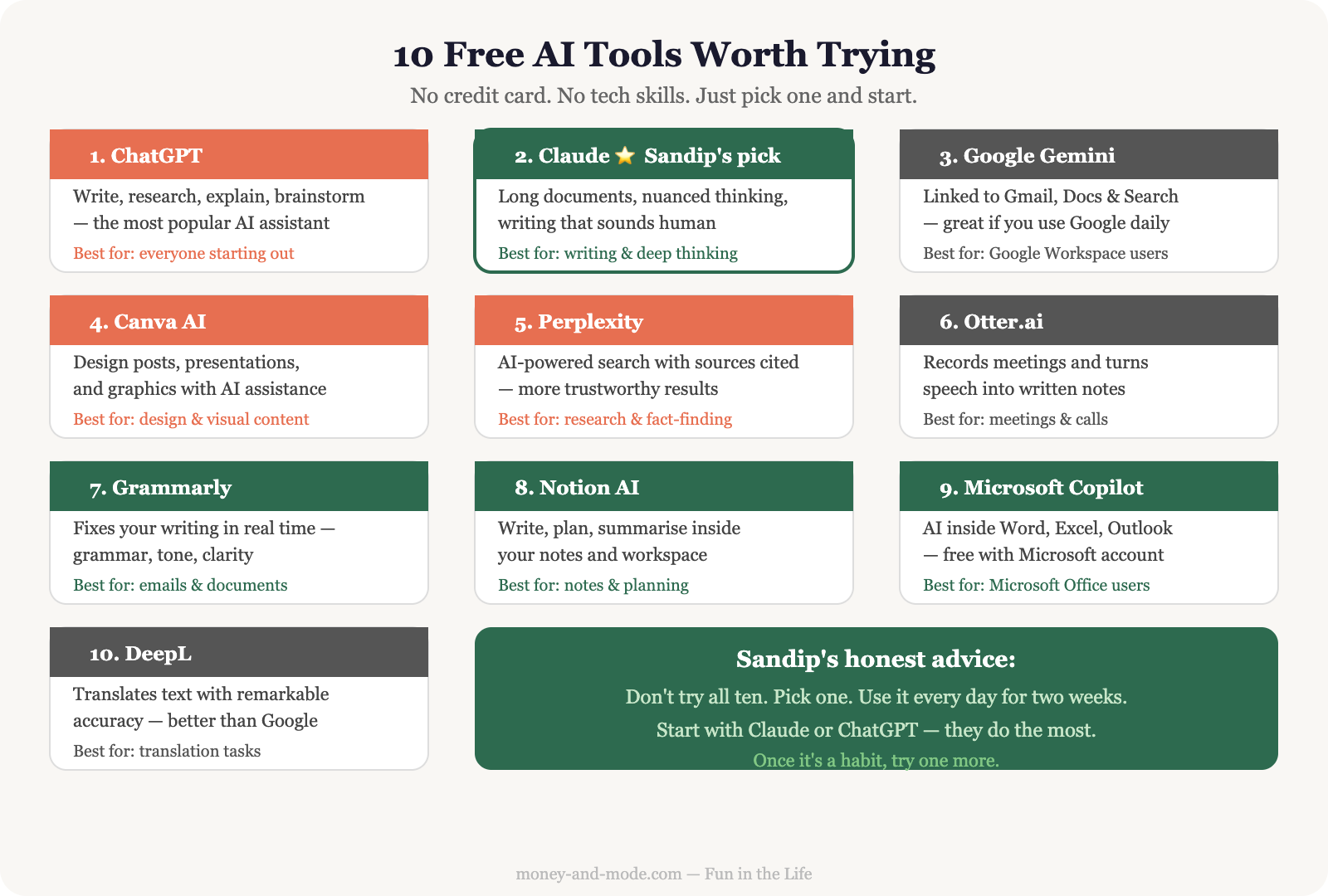
Free AI Tools for Everyday Life: The Complete Beginner’s List
Let’s go through all ten. I’ll keep it short. No jargon. Just what matters.
1. ChatGPT (by OpenAI)
This is the one most people have heard of. ChatGPT is like having a very knowledgeable assistant you can chat with in plain language. Ask it to write an email, explain a concept, brainstorm ideas, or summarise a long article. The free version (GPT-3.5) is perfectly capable for most everyday tasks. Best for: anyone just starting out with AI.
2. Claude (by Anthropic)
I’ll be honest — this is my personal favourite, and I use it every single day. Claude is especially good at reading long documents, having nuanced conversations, and helping you think through complex decisions. If you need to understand a contract, write something that actually sounds like a human, or work through a tricky problem, Claude handles it beautifully. Best for: writing, document analysis, and deep thinking. (It’s also the AI powering this very response — so I may be a little biased!)
3. Google Gemini
If you already use Gmail or Google Docs, Gemini is already waiting for you. Google has woven its AI directly into its tools, so you can ask it to help draft emails, summarise documents, or even create a presentation outline — without leaving apps you already use. Best for: people in the Google ecosystem who want AI without switching apps.
4. Perplexity AI
Think of Perplexity as a smarter search engine. Instead of giving you ten blue links to click through, it reads the web for you and gives you a proper answer — with sources you can verify. I use it when I want to research something quickly and don’t want to spend twenty minutes reading multiple websites. Best for: research, fact-checking, and getting quick, sourced answers.
5. Canva AI
Canva has been a favourite for non-designers for years. Now it has AI built in — you can type what you want and it generates a design. You can also use it to remove backgrounds from photos, create presentations, and make graphics — all without any design training. Best for: small business owners, bloggers, anyone who needs to look polished online.
6. Grammarly
Grammarly has been around for years but it keeps getting smarter. It sits quietly in your browser or email app and suggests improvements to your writing — fixing grammar, improving tone, and even flagging when something sounds unclear. The free version catches most common mistakes. Best for: anyone who writes emails, reports, or messages and wants to sound more professional.
7. Otter.ai
Otter records meetings and automatically turns the spoken conversation into text — a transcript — so you never have to take notes again. The free plan gives you 300 minutes of transcription per month, which is enough for most people. Just let it run in the background during your call. Best for: professionals who attend a lot of meetings, students, or anyone who hates taking notes.
8. Notion AI
Notion is a notes and organisation app — like a smarter, more flexible version of Microsoft Word and Excel combined. The AI features help you summarise your notes, write content, create to-do lists from meeting notes, and organise your thoughts. The free tier has limits but is enough to try it properly. Best for: students, freelancers, and anyone who wants to get more organised.
9. Google NotebookLM
This is a hidden gem from Google. You upload your own documents — a PDF, a research paper, your own notes — and NotebookLM reads them and lets you ask questions about them. It’s like having an assistant who has carefully read everything you’ve given it. I’ve used it to quickly understand lengthy business reports. Best for: anyone who needs to make sense of long documents without reading every word.
10. Microsoft Copilot
If you use Windows or Microsoft 365 (Word, Excel, Outlook), Copilot is Microsoft’s AI assistant built right in. You can ask it to draft documents, summarise emails, create spreadsheet formulas, and more. Many versions are free, especially if you already have a Microsoft account. Best for: people already using Microsoft Office who want AI without signing up for anything new.
My Honest Advice: Don’t Try All 10 at Once
Here’s something I’ve seen happen — people get excited, sign up for everything, and end up using nothing. I’ve been there too.
Pick one or two tools and actually use them for two or three weeks. Get comfortable. Let it change how you work. Then, if you want more, add one more.
For most people, I’d suggest starting with ChatGPT or Claude for general use, and Grammarly if you write a lot. That combination alone will save you time and make your work better.
If you want to understand the bigger picture of how AI is already changing daily life — not just work, but shopping, health, and home — I’d recommend reading How AI Is Changing Everyday Life first. It sets the context beautifully.
And if time-saving is what you’re after, How to Use AI to Save 2 Hours Every Day shows you exactly where to start with practical routines that work.
The Real Reason These Tools Matter
I’ve spent 25 years in the technology business. I’ve seen many waves of new tools come and go. Some were just hype. AI is not hype.
But here’s what I believe: the goal is never to use the most advanced tools. The goal is to live better. Work smarter. Have more time for the things and people you love.
These free AI tools — used wisely — genuinely give you that. They handle the repetitive, the mechanical, the draining parts of your day so you can focus on what actually matters.
You don’t need to be a tech expert. You just need to start. One tool. One week. See what happens.
One last thought: some people worry that AI will replace their jobs or make skills irrelevant. I understand that concern. If you’re thinking about it, Will AI Take My Job? gives an honest, grounded answer — not the scary version you read in the news.
Frequently Asked Questions
What are the best free AI tools for everyday use?
Ten are worth knowing: ChatGPT, Claude, Google Gemini, Perplexity AI, Canva AI, Grammarly, Otter.ai, Notion AI, Google NotebookLM and Microsoft Copilot. Each has a genuinely usable free tier, and most take under five minutes to get started.
Which AI tool should a complete beginner start with?
ChatGPT or Claude for general use, plus Grammarly if you write a lot. That combination alone will save you time and make your work better. Do not sign up for all ten — people who get excited and register for everything usually end up using nothing.
What is each of these AI tools actually best at?
ChatGPT for starting out. Claude for writing, long documents and thinking through decisions. Gemini if you already live in Gmail and Google Docs. Perplexity for sourced research. Canva for design without training. Grammarly for polish. Otter for meeting transcripts. NotebookLM for questioning your own documents.
Are the free versions actually good enough?
For most everyday tasks, yes. Otter gives 300 transcription minutes a month. Notion AI and Microsoft Copilot have usable free tiers. The free versions of ChatGPT and Claude handle the majority of ordinary work. Pick one or two and use them properly for two or three weeks.
Which of these ten tools are you going to try first — and what’s the one task you’re hoping it will help you with? Tell me in the comments below.